A campus app for students, parents and teachers
Six role-based apps on one campus record: administrator, teacher, student, parent, office staff and librarian. Each one shows only what that role is permitted to see, so a parent portal app and a teacher's register are the same school mobile app scoped differently.
The apps are not listed on the App Store or Google Play yet. Talk to us about access for your institution and we will tell you where that stands.
- Students
- Parents
- Teachers
- Administrators
- Office staff
- Librarians


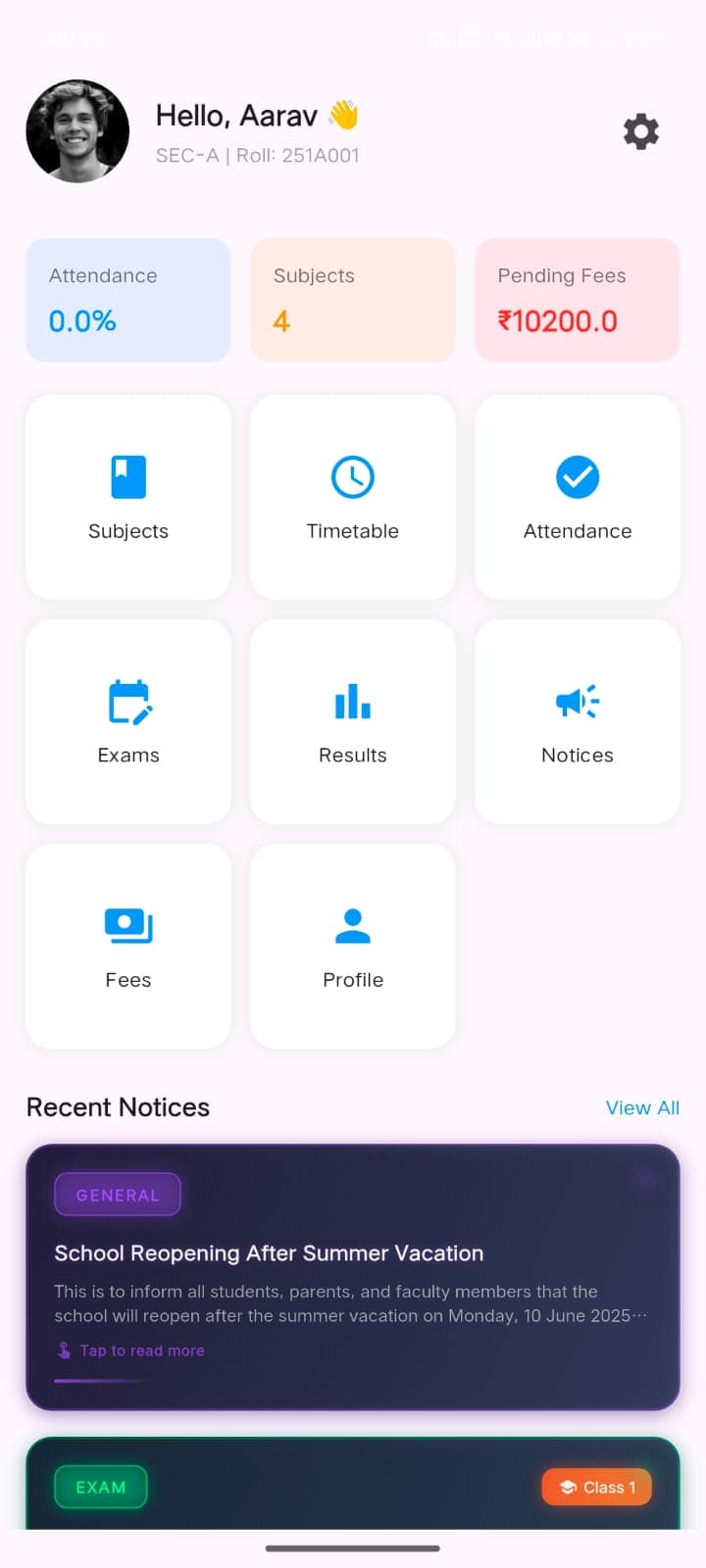
Campus Connect — Student HubEverything in Your Pocket
The student app opens on the things a student checks daily: today's timetable, attendance against the shortfall threshold, marks as they are released, and the notices the school has sent. Assignments show what is set, what is due and what has been marked. It is scoped to the signed-in student, so there is nothing to filter and nothing to scroll past.
Instant Notices
Receive school announcements immediately
Attendance & Lessons
Mark attendance and access class materials
Grades & Reports
View marks and progress reports
Calendar & Events
Never miss important dates
Faculty Self-ServiceTeach, Manage, Report
Teaching staff mark the register during the period rather than transcribing it afterwards. Marks are entered against their own papers, inside the window the examination office sets. Messages to a class go through the institution's channel, not a personal number. The teaching timetable includes substitutions assigned at short notice.
Class & Attendance
Quickly manage rolls and schedules
Schedule & Meetings
Organize classes and events
Course Management
Manage content and assessments
Insights & Reports
Access performance analytics
Parent ConnectStay Informed
Guardians see their own child and no other. Absence alerts arrive the same morning rather than in a monthly summary. Fee balances show what is due, what is paid and what is overdue, settled online rather than in a queue on collection day. Report cards download as the school releases them.
Teacher Chat
Direct messages with teachers
Attendance Overview
Monitor daily attendance
Homework & Syllabus
View assignments and materials
School Alerts
Receive important announcements
What each role actually sees
All six apps run on the same records, and permissions decide what reaches each screen. A student sees their own attendance and marks. A parent sees their own child's, and no other family's. A teacher sees the classes they teach. Read down your own column, or across to see what the others get.
Student App Features
6 features
Notices & Circulars
Circulars and notices land on the phone and stay in a list you can scroll back through, so nothing depends on catching a noticeboard
Assignments
Upload work from the phone before the deadline, and see the teacher's marks and remarks on it once the submission has been assessed
Results
Subject-wise marks and the grade for each term, released together when the examination office publishes them
Timetable
Today's periods with room and teacher, plus the full week, updated when a substitution or room change is made
Attendance
Attendance per subject and overall, against the institution's own shortfall threshold, so a problem is visible long before the term ends
Exam Schedules
The examination timetable with dates, papers, rooms and seat allocation as the office publishes it
Faculty App Features
6 features
Student Management
The roll for each class taught, with contact details, attendance history and marks for the students that teacher is responsible for
Attendance
Late arrivals and approved absences are recorded separately from unexplained ones, so the shortfall calculation reflects what actually happened
Timetable
The day's periods and the full week, with any cover duty a teacher has been given showing alongside their own classes
Performance
Class and section performance across assessments, so a subject that is slipping shows up as a trend rather than a surprise
Communication
Message a class, a section or an individual student through the institution's own channel rather than a personal number
Announcements
Send a notice to the classes taught, delivered as a push notification and recorded against the sender
Parent App Features
6 features
Child Progress
Marks, grades and report cards for your own child only, released when the school publishes them
Attendance
Day-by-day and subject-wise attendance, with an alert the same morning if your child is marked absent
Fee Payment
Pay by UPI, card or netbanking from the phone, with the receipt issued straight away and the payment posted against the right fee head
Teacher Chat
Message your child's teachers through the school's own channel, with the history kept and searchable
Events
Examinations, holidays, meetings and events for your child's class in one calendar
Reports
Keep every term's report card and transcript on the phone, so a copy is to hand without a trip to the office
Administrator App
5 features
Live Dashboards
Enrolment, attendance and collection across the institution, reading the same records the web dashboards use
Approvals
Leave requests, fee concessions and admission decisions cleared from the phone instead of waiting for a desk
Institution Notices
Send a circular to a class, a year group or everyone, recorded against the sender and delivered in-app
Staff Overview
Teaching load, leave and cover across departments, so a gap is visible before the timetable breaks
Reports on Demand
Pull a collection, attendance or performance report for a board meeting without going back to a workstation
Office Staff App
4 features
Fee Desk
Look up what a family owes, record an offline payment and issue the receipt while the parent is still at the counter
Admission Enquiries
Log a walk-in enquiry against the admissions pipeline so it is not lost on a notepad
Document Requests
Handle transfer certificate, bonafide and transcript requests, with the status visible to whoever asks next
Front Desk Messaging
Answer parent queries from the front desk, with every exchange attached to the student record rather than to a personal phone
Librarian App
4 features
Issue & Return
Scan a student ID card to issue or return a title, against the same student record the rest of the platform uses
Due Dates & Fines
Overdue titles and any fine due are visible per student, and the fine posts to the same fee ledger
Catalogue Search
Check availability and shelf location without walking back to the library terminal
Return Reminders
Reminders reach the borrower and, for younger students, the guardian on record
How schools get the apps
Until public store listings go live, the apps are set up for your institution during onboarding. Accounts come from the student and staff records you already hold, so nobody self-registers. That is what keeps a parent from ever seeing another family's child, and a teacher from seeing a class they do not teach. Availability, pricing and exit terms are all written down in our terms of service, including the 99.9% monthly uptime target and the service credits that apply if we miss it.
- iOS and Android builds
- Six role-based apps, included with the platform
- 99.9% monthly uptime target, in our terms